Web Development Guides & Resources

Explore practical insights, expert tips, and in-depth guides on WordPress, web development, performance optimization,
SEO, and more to help you build and manage better websites.

Autoptimize Plugin : Optimizing Your Website!

Autoptimize is a WordPress plugin that helps speed up your website by optimizing scripts, styles, and HTML. It combines and minifies files, improves page load times, and boosts performance. Easy to set up, it’s perfect for enhancing user experience and SEO.

Read More »

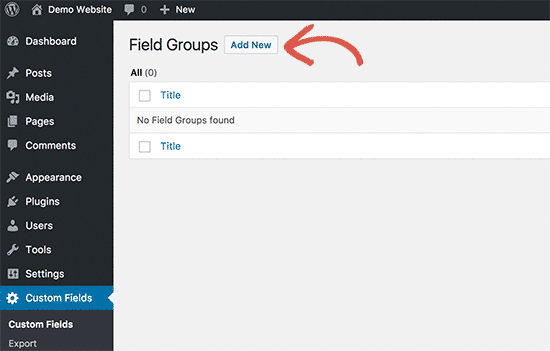
Creating a Field Group

Select the wp-content on Custom Fields  —> Field Groups Click on  Add New Button Then after Add New Field Group Name  and Add Fields like Fields Label, Fields Name, Fields Type. Title:- Each Field Group Requires a Title. Title is shown in the Metabox Handle on The Edit Screen to use Relevant Titles Such as “Home Page”. Fields:- Here you can create and manage a variety of custom fields. Clicking the “Add Field” button will create a new field and

Read More »

WooCommerce

WooCommerce is a powerful WordPress plugin that allows you to build a fully functional online store. Sell physical and digital products, manage inventory, and integrate multiple payment gateways. Perfect for businesses of all sizes looking to grow online.

Read More »

How to Install Advance Custom Field?

Learn how to install Advanced Custom Fields (ACF) in WordPress to add custom fields and enhance your site’s functionality. This step-by-step guide makes it easy to create tailored content and manage data efficiently. Perfect for developers and site owners alike.

Read More »

How to install the Classic Editor plugin?

The Classic Editor plugin allows you to restore the previous WordPress editor, replacing the new block-based Gutenberg editor. It’s perfect for users and developers who prefer a simple, familiar interface for creating posts and pages. Why Use the Classic Editor? WordPress introduced the Gutenberg block editor to give more flexibility, but many users find it complex for everyday editing. The Classic Editor plugin: Restores the familiar WordPress editor interface. Supports all previous editing workflows, including TinyMCE toolbar. Works with existing

Read More »

Move a WordPress Site to a New Host with All in One WP Migration

Migrating a WordPress site to a new host can seem complicated, but with the All-in-One WP Migration plugin, it’s simple and safe. This plugin handles your database, media files, plugins, and themes, making the migration process fast and hassle-free. Why Use All-in-One WP Migration? All-in-One WP Migration is one of the most popular migration plugins for WordPress. Here’s why: Supports migration of the entire site, including database, media, plugins, and themes. Handles serialization and avoids common migration errors. Easy to

Read More »